Crafting the Perfect Holiday Vibe with a Laser Cut Hot Chocolate Gnome Sign SVG
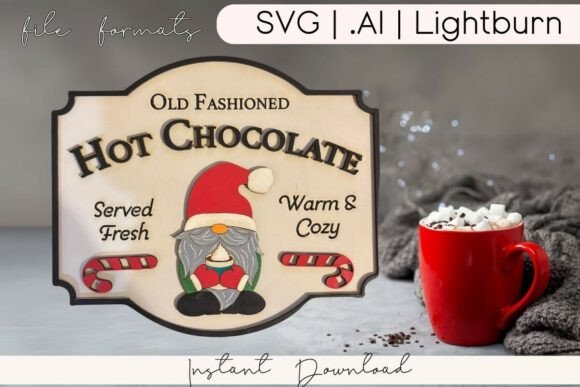
The holiday season often hinges on small details that transform a house into a home. Among the most popular trends in DIY decor is the creation of cozy, inviting spaces centered around warm drinks and rustic aesthetics. A Laser Cut Hot Chocolate Gnome Sign SVG has emerged as a favorite project for makers looking to add charm to their kitchens or hot cocoa bars. This design typically features a whimsical Christmas gnome donning a Santa hat, surrounded by candy canes and cozy lettering inspired by old-fashioned stand signs. While the end result is undeniably charming, the journey from downloading a file to hanging a finished piece involves several critical decisions. Understanding the nuances of these digital assets can save you time, material, and frustration.
Understanding the File Formats and Compatibility
One of the first hurdles creators face is assuming all vector files work identically across every machine. When you purchase a bundle containing SVG, AI, and Lightburn files, it is tempting to grab the first one that opens. However, different cutting machines have specific strengths. For instance, users of Glowforge, xTool, or Omtech laser cutters will find the dedicated Lightburn file invaluable because it often comes with tested cut settings. These pre-configured settings account for line types, power, and speed, which are essential for achieving clean edges on layered wood.
Conversely, crafters using Cricut or Silhouette machines rely heavily on the SVG format within design software like Cricut Design Space. A common mistake here is ignoring the layer structure upon import. Multi-layer cut files are designed to be assembled physically; if the layers are not correctly grouped or colored in your software, you may end up cutting pieces that should remain solid or missing intricate details like the gnome's beard or the text outlining. Always take a moment to inspect the layers panel immediately after opening the file to ensure every element is distinct and ready for cutting.
Avoiding Material and Design Mismatches
The aesthetic appeal of a Laser Cut Hot Chocolate Gnome Sign SVG relies heavily on the contrast between layers. A frequent oversight occurs when makers choose materials that are too similar in tone. If you cut every layer from the same type of unfinished plywood, the delightful details of the candy canes and the gnome's hat may get lost once the sign is assembled. The design intends for depth and visual pop, which requires thoughtful material selection.
To avoid a flat-looking final product, consider mixing materials. Use a darker stained wood for the background layers and a lighter, natural wood for the foreground elements like the lettering and the gnome's face. Alternatively, this project is an excellent candidate for painting. As suggested in many crafting communities, using red, green, and metallic paints can make the details truly stand out. If you prefer a rustic farmhouse look, applying a light wood stain to specific layers while leaving others raw creates a sophisticated, textured appearance. The key is to plan your finish before you make your first cut, as changing your mind after gluing layers together is difficult and messy.
Optimizing for Efficiency and Quality
Time management is another area where beginners often stumble. Because these files are available for instant download, there is a tendency to rush straight to the laser bed without a dry run. Skipping a test cut on scrap material can lead to wasted expensive hardwood if the settings are slightly off. Even with "tested" Lightburn settings, variables such as humidity, wood density, and lens cleanliness can affect the outcome. Always perform a small test grid to verify that your lines cut through completely without excessive charring.
Furthermore, pay attention to the complexity of the design relative to your machine's capabilities. Intricate lettering and small gnome features require a machine with good precision. If you are using a diode laser with a larger spot size, very fine details might burn away or fail to cut cleanly. In such cases, you might need to simplify the design slightly in your vector software or choose a thicker material that forgives minor imperfections. Ensuring your machine is properly focused and calibrated is just as important as the file itself.
Maximizing Versatility for Different Uses
While these signs are perfect for holiday kitchen decor, limiting them to a single use case is a missed opportunity. Entrepreneurs and small business owners often look for versatile designs that can serve multiple purposes throughout the season. This specific SVG is ideal not just for wall art, but also for creating standalone table centerpieces for holiday parties or even as personalized gifts for cocoa enthusiasts. By adjusting the scale of the cut, you can create mini versions for gift tags or large statement pieces for a front porch.
For those selling at craft fairs, customization is a powerful tool. Since the file allows you to customize text, colors, and layers, you can offer personalized versions with family names or specific dates. This adds significant value to the product. However, remember to check the licensing terms of your download. Most personal use licenses allow you to sell physical finished goods, but redistributing the digital file itself is usually prohibited. Clarifying this upfront protects your business and respects the original designer's work.
Final Checks Before You Cut
Before committing your material, do a final review of your project setup. Ensure that your workspace is organized and that you have all necessary adhesives and finishing supplies ready. Layered projects require patience during assembly; using the right glue, such as wood glue or a strong craft adhesive, ensures the sign stays intact over time. Also, consider how the sign will be hung. Will you add a ribbon, a sawtooth hanger, or drill holes directly into the wood? Planning the mounting method beforehand prevents last-minute modifications that could compromise the structural integrity of the sign.
Creating a Laser Cut Hot Chocolate Gnome Sign SVG project is a rewarding way to bring cozy holiday charm into your space. By paying attention to file compatibility, material choices, machine settings, and finishing techniques, you can elevate a simple cut file into a professional-quality piece of decor. Whether you are a hobbyist looking to decorate your own home or a creator building inventory for the holiday rush, taking these corrective steps ensures your results are as warm and inviting as the hot cocoa they celebrate.