Rattan Photo Frame Bundle 234: Digital Laser Files
If you have ever spent hours trying to manually replicate the intricate weave of natural rattan or cane in a design program, you know the frustration. It is tedious, prone to error, and often results in files that are too heavy for your laser cutter to process efficiently. This is where the Rattan Photo Frame Bundle 234 changes the game. It offers a shortcut to professional-grade aesthetics without the steep learning curve or the time investment.
Before we dive into the design specifics, it is crucial to clarify exactly what you are purchasing. Please note that you will not be sent ANYTHING PHYSICAL. This is a DIGITAL CUT FILE for those using a laser machine like Glowforge, Xtool, Omtech, Gweike, and others. This is NOT something you will receive in the mail. You are buying the intellectual property and the precise vector paths needed to create these frames yourself. For makers, this distinction is vital because it means instant access. There is no shipping delay, no damaged goods, and no inventory storage required. You download, import, and cut.
Why the Cane Pattern Remains a Design Staple
The rattan or cane look has transcended its mid-century modern roots to become a contemporary classic. It adds texture, warmth, and visual interest to otherwise flat surfaces. However, cutting organic-looking woven patterns with a laser requires precision. If the bridges are too thin, they snap during weeding. If they are too thick, the design loses its delicate appeal.
The Rattan Photo Frame Bundle 234 solves this engineering challenge. The files are meticulously designed to balance aesthetic fidelity with structural integrity. The digital vectors account for kerf—the width of the laser beam—ensuring that pieces fit together snugly without requiring excessive force or adhesive. This attention to detail is what separates a amateur hobby project from a product you can confidently sell at a craft fair or online marketplace.
Versatility Through Multiple Sizes
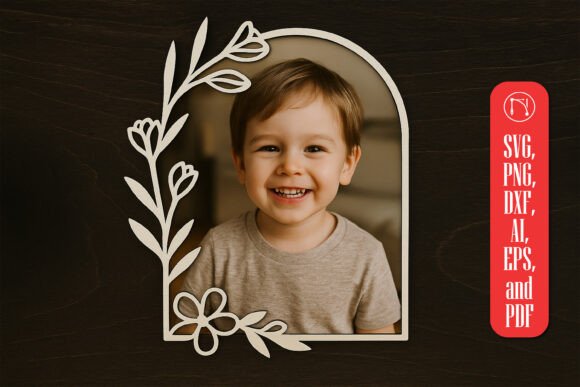
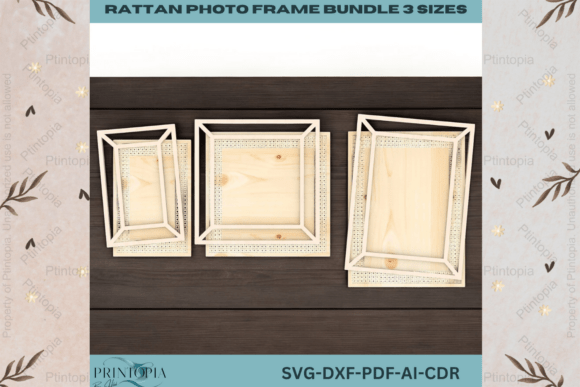
One size rarely fits all in the world of custom framing. This bundle includes three different sizes, providing immediate versatility for your craft projects. Whether you are looking to display a standard 4x6 snapshot, a square Instagram favorite, or a larger 8x10 portrait, this collection has you covered. Having multiple sizes in one package allows you to create cohesive gallery walls or matching sets for gifts, which increases the perceived value of your work.
For entrepreneurs, this variety is a significant advantage. You can offer tiered pricing based on size, upsell customers from a single frame to a set, or create bundled gift packages for holidays and weddings. The ability to produce multiple sizes from a single purchase reduces your overhead costs and simplifies your product line management.
Technical Compatibility and Ease of Use
The barrier to entry for laser cutting is often software compatibility. You might have a fantastic design, but if it does not open correctly in your preferred program, it is useless. The Rattan Photo Frame Bundle 234 addresses this by providing files in SVG, DXF, AI, PDF, and CDR formats. This broad spectrum ensures compatibility with a vast array of machines and software ecosystems.
- SVG: Ideal for web-based designers and users of Silhouette Studio or basic laser software.
- DXF: The standard for many industrial and prosumer CAD programs.
- AI and CDR: Perfect for Adobe Illustrator and CorelDRAW users who need to edit nodes or adjust dimensions before cutting.
- PDF: Useful for quick previews or printing templates for manual reference.
These digital files are optimized for use with a range of laser cutting machines, including but not limited to Glowforge, Xtool, Omtech, and Gweike. The designs are crafted to provide smooth and accurate cuts, ensuring your finished products look professional and polished. Whether you are an experienced designer or a beginner, these files are compatible with popular design and editing software such as LightBurn, Adobe Illustrator, Inkscape, CorelDRAW, AutoCAD, and Photoshop. The files are easy to import and ready to use, allowing you to focus on your creativity without worrying about complex file conversion or vector repair.
Practical Applications for Makers and Businesses
So, what can you actually do with these files? The applications extend far beyond simple home decor. Here are several real-world scenarios where this bundle adds value:
1. Custom Wedding and Event Favors
Weddings are increasingly leaning towards personalized, rustic-chic themes. A rattan-style photo frame makes for an elegant favor or a unique guest book alternative. You can cut these from birch plywood for a natural look or acrylic for a modern twist. Because the files are digital, you can produce them on demand, reducing waste and storage issues for event planners.
2. Retail Product Lines
If you run an Etsy shop or a local boutique, consistent product quality is key. Using pre-tested vector files ensures that every frame you cut meets the same high standard. You can experiment with different materials—such as stained wood, painted MDF, or even leather overlays—to create distinct product lines without redesigning the core structure.
3. Educational Projects
Educators teaching design, geometry, or manufacturing can use these files to demonstrate the relationship between 2D designs and 3D objects. Students can learn about material constraints, joinery techniques, and the importance of vector cleanliness. The Rattan Photo Frame Bundle 234 serves as an excellent case study in efficient design for fabrication.
4. Corporate Branding and Gifts
Businesses often look for unique ways to recognize employees or clients. A custom-engraved photo frame with a company logo added to the base (using the editable AI or CDR files) creates a thoughtful, high-perceived-value gift that aligns with modern office aesthetics.
Material Considerations for Best Results
While the digital file is perfect, the final output depends heavily on your material choice. For the authentic rattan look, light-colored woods like birch, maple, or basswood are ideal. They highlight the intricate cut patterns and take stain well if you wish to darken the finish. Acrylic is another excellent option, particularly for a more contemporary, glossy appearance. When using acrylic, ensure your laser settings are tuned for clean edges to avoid melting the delicate weave patterns.
Remember, since this is a digital product, you have the freedom to experiment. Try cutting one layer in wood and another in contrasting colored acrylic for a layered effect. The possibilities are limited only by your machine’s capabilities and your imagination.
Maximizing Efficiency in Your Workflow
Time is money for any creator. By utilizing the Rattan Photo Frame Bundle 234, you eliminate the design phase entirely. Instead of spending hours drawing vectors, you spend minutes arranging them on your material bed for optimal nesting. This efficiency allows you to take on more commissions, reduce labor costs, and scale your production. It is a small investment that yields significant returns in productivity and professional presentation.
In conclusion, this bundle is not just a set of files; it is a tool for elevating your laser cutting business or hobby. It combines timeless design with modern manufacturing efficiency, offering a seamless path from digital download to physical masterpiece. Just remember, you are purchasing the digital blueprint, not the physical frame. With the right machine and material, you can bring this elegant design to life in minutes.